Angular’s ‘root’ and ‘any’ provider scopes
In this blog post we will explore 2 values for providedIn property used with Angular provider.
 Santosh Yadav Feb 15, 2020 7 min read
AngularInDepth is moving away from Medium. This article, its updates and more recent articles are hosted on the new platform inDepth.dev
In this blog post we will explore 2 values for providedIn property used with Angular provider Scope.
Introduction
If you are following Angular 9 release, you may have heard about providedIn has few more properties, module injector scope has been possible since version 2, tree-shakable module scope became available in version 6 with providedIn: MyServiceModule,and now we have ‘any’ and ‘platform’ .
In this blog post we will see the example why we needed 'any' and how it is useful. Will leave ‘platform’ for next blog-post.
Tree-shakable Providers
In Angular 6 providedIn property was added to providers, to make services tree shakable. If you are new to Angular, let me give you an simple explanation what we mean by tree shaking. It is a process to remove unused code from our application. It means if you created a service but do not use it, in your application the code will not be part of final production build. To learn more you can refer to this blog post from Lars Gyrup Brink Nielsen:
Tree-shakable Dependencies in Angular Projects
_Tree-shakable dependencies are easier to reason about and compile to smaller bundles._medium.com
Why the any scope?
So we now know why 'root' was introduced, the idea was to make services tree-shakable. To understand providedIn: 'any' we have to talk a little bit about implementation of forRoot, forChild and lazy loading. If you have used Angular Router or NgRx then you know about these methods.
The problem of working with lazy loaded module is that if we use providedIn: 'root' even though we think we should get a new instance of a service, it gives the same instance and that might not be the behavior we expect. When working with a lazy-loaded module, a new instance should be created when we load the module.
Let’s write some code to see what was the issue earlier and how 'any' resolves that for us.
What we are going to achieve
- A config service which will take some config parameter
apiEndpointandtimeout. - 2 lazy-loaded modules: employee and department. They want to use the config service, but with different values.
The problem with using the root scope
- Create a new Angular 9 app using the below command
npx -p @angular/cli@next ng new providerdemo- Now let’s create 2 new lazy-loaded modules with components. Run the below commands
npx -p @angular/cli@next ng g module employee --routing --route employeenpx -p @angular/cli@next ng g module department --routing --route department --module app- Create a new value provider and an interface. You can add it in a new
sharedfolder, as this code will be shared between multiple modules.
export interface Config { apiEndPoint: string; timeout: number;}import { InjectionToken } from '@angular/core';import { Config } from './demo.config';
export const configToken = new InjectionToken<Config>('demo token');- Next, create a new service. We will call it
ConfigServicewhich will read the value from token and use it to perform some operation. Use the below command to create it.
npx -p @angular/cli@next ng g service shared/config- Once created, add the below code to your service
import { Injectable, Inject } from '@angular/core';import { configToken } from './demo.token';import { Config } from './demo.config';
@Injectable({  providedIn: 'root'})export class ConfigService {
  constructor(@Inject(configToken) private config: Config) {    console.log('new instance is created');  }
getValue() { return this.config; }}- Now let’s use this service in the Employee and Department Components we created with their respective modules. We are just printing the values received from Token.
import { Component, OnInit } from '@angular/core';import { ConfigService } from '../shared/config.service';
@Component({  selector: 'app-employee',  templateUrl: './employee.component.html',  styleUrls: ['./employee.component.css']})export class EmployeeComponent implements OnInit {
  constructor(private configService: ConfigService) { }
  ngOnInit(): void {    console.log(this.configService.getValue());  }
}
import { Component, OnInit } from '@angular/core';import { ConfigService } from '../shared/config.service';
@Component({ selector: 'app-department', templateUrl: './department.component.html', styleUrls: ['./department.component.css']})export class DepartmentComponent implements OnInit {
constructor(private configService: ConfigService) { }
ngOnInit(): void { console.log(this.configService.getValue()); }}- Next, let’s try to pass 2 different configuration for Employee and Department, add the below code into both the modules.
import { NgModule } from '@angular/core';import { CommonModule } from '@angular/common';
import { EmployeeRoutingModule } from './employee-routing.module';import { EmployeeComponent } from './employee.component';import { Config } from '../shared/demo.config';import { configToken } from '../shared/demo.token';
export const configValue: Config = {  apiEndPoint: 'abc.com',  timeout: 3000};
@NgModule({  declarations: [EmployeeComponent],  imports: [    CommonModule,    EmployeeRoutingModule  ],  providers: [{    provide: configToken, useValue: configValue  }]})export class EmployeeModule {  constructor() { }}
import { NgModule } from '@angular/core';import { CommonModule } from '@angular/common';
import { DepartmentRoutingModule } from './department-routing.module';import { DepartmentComponent } from './department.component';import { Config } from '../shared/demo.config';import { configToken } from '../shared/demo.token';
export const configValue: Config = { apiEndPoint: 'xyz.com', timeout: 4000};
@NgModule({ declarations: [DepartmentComponent], imports: [ CommonModule, DepartmentRoutingModule ], providers: [{ provide: configToken, useValue: configValue }]})export class DepartmentModule { }- As seen, the difference is in the config values. Let’s run the application and see what we get. Remember the
providedInvalue is still'root'. To test the application in it’s current state, let’s add links to the routes. Add the below snippet inapp.component.html
<a routerLink="employee">Employee</a><br><a routerLink="department">Department</a><router-outlet></router-outlet>- Next, run the application using the below command
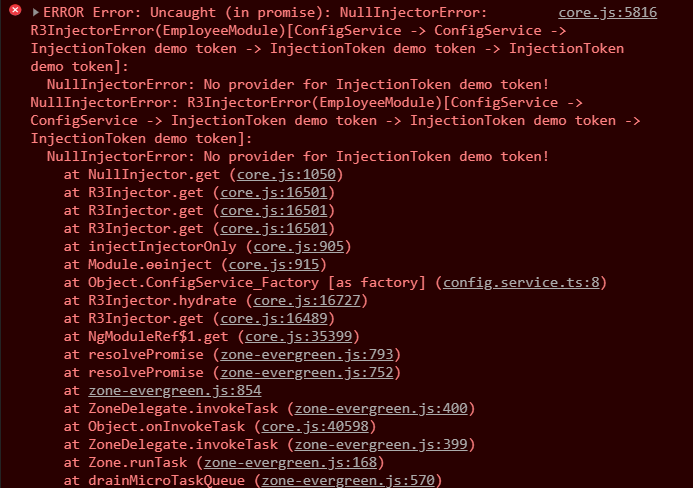
npx -p @angular/cli@next ng serve -o- The application works, but when we click on a link, boom we have an error. Our expectation was to see the different config values, but we have the below error.
provider-error
So what went wrong here?
We did everything right. Our expectation was to get different config values for both the employee and department components, but we ended up getting an error. This is due to the providedIn: 'root' value. Refer to Figure 1 to visualize what happened.
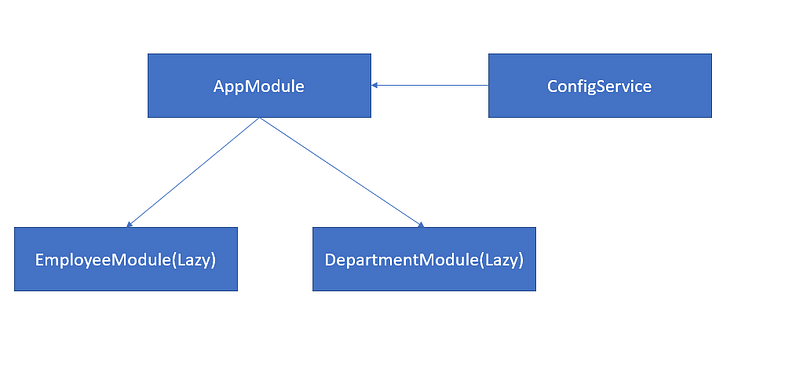
Figure 1. Root provider scope.
When we provide the service with providedIn: 'root', it is registered with our AppModule. As soon as we tried to activate one of the routes, the service expected the config value which was not provided. So let’s make it work by making changes to our AppModule.
Add the below code to your app.module.ts
import { BrowserModule } from '@angular/platform-browser';import { NgModule } from '@angular/core';
import { AppRoutingModule } from './app-routing.module';import { AppComponent } from './app.component';import { Condfig } from './shared/demo.config';import { configToken } from './shared/demo.token';
export const configValue: Config = {  apiEndPoint: 'def.com',  timeout: 5000};
@NgModule({  declarations: [    AppComponent  ],  imports: [    BrowserModule,    AppRoutingModule  ],  providers: [{    provide: configToken, useValue: configValue  }],  bootstrap: [AppComponent]})export class AppModule { }
Now the application works, but when we click on the links, we see the below 2 values for both the employee and department components. This is the expected behavior as per Figure 1.
apiEndPoint: 'def.com'timeout: 5000What we wanted to achieve
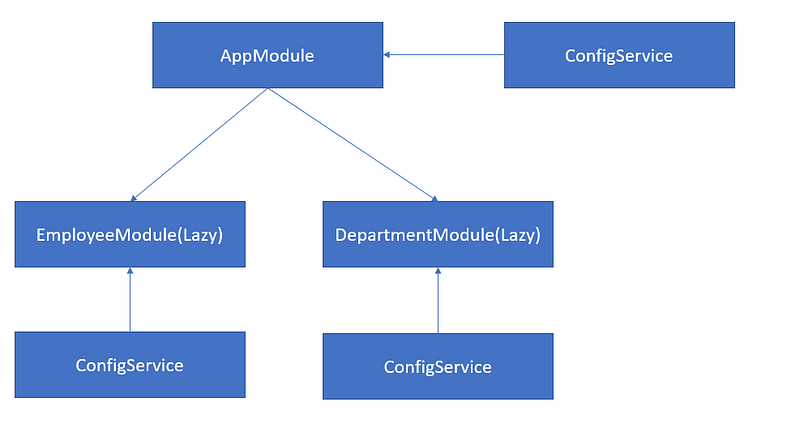
Figure 2. Injector provider scope.
In reality, we wanted something like Figure 2 , where each module has their own instance. With providedIn: 'root', this was not possible.
- To resolve this issues, the previous solution was implementing
forRootandforChildstatic methods, so each component can have their own instances. - The other way to achieve this was to provide the
ConfigServicein each and every module. The problem is then, that the service is no longer tree-shakable.
@NgModule({ providers: [ ConfigService, { provide: CONFIG_TOKEN, useValue: CONFIG_VALUE } ]}export class EmployeeModule { }- Now let’s change the
providedInoption forConfigServiceto below
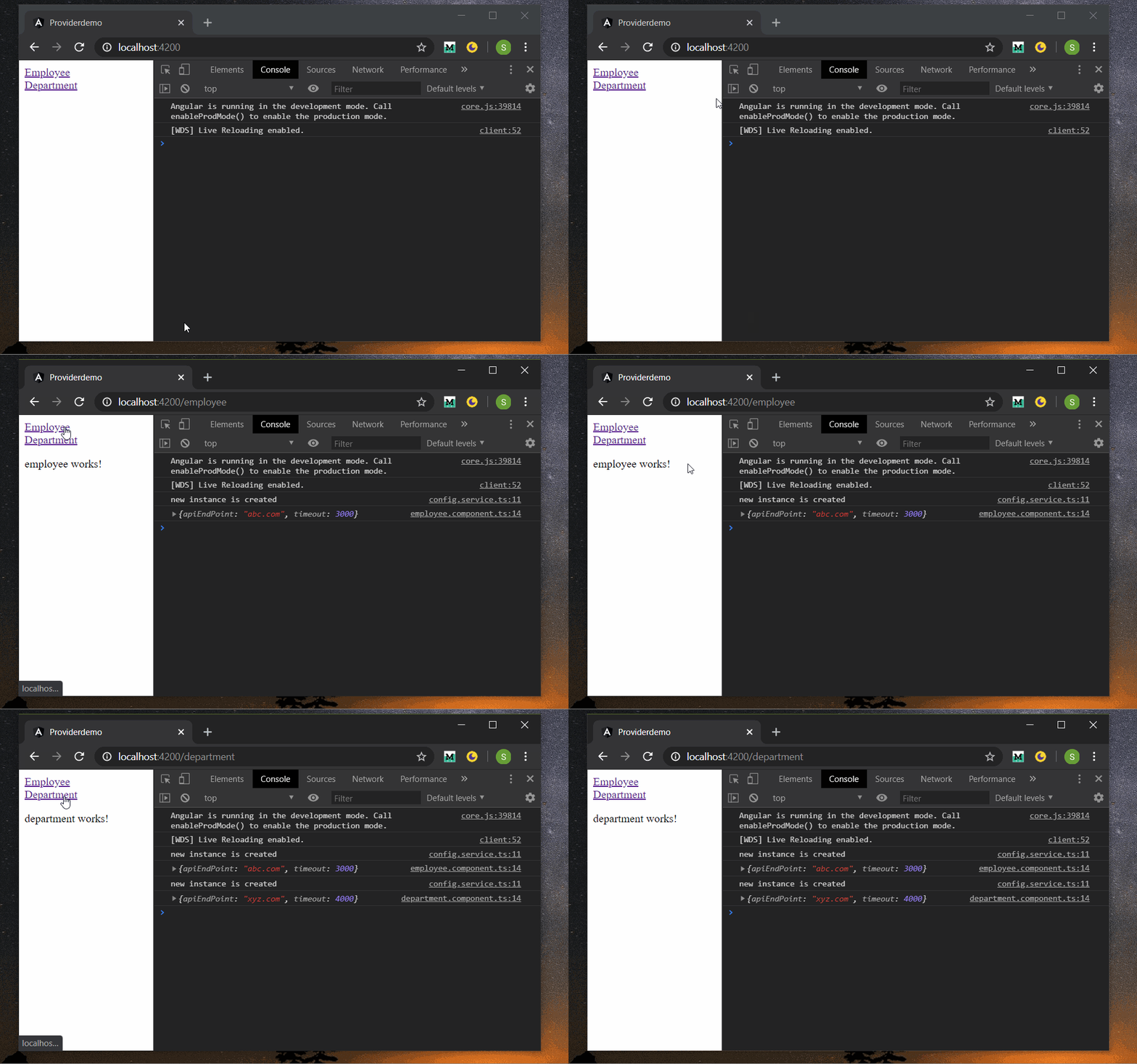
@Injectable({ providedIn: 'any'})- Run the application again and notice the console now.
Final App
- Bingo, we got the separate instances without implementing
forRootorforChildstatic methods or compromise regarding tree-shakable providers.
So what happened after changing to providedIn: 'any'? As shown in Figure 3, now all eagerly loaded modules will share one common instance and all lazy-loaded modules will have their own instance of ConfigService.
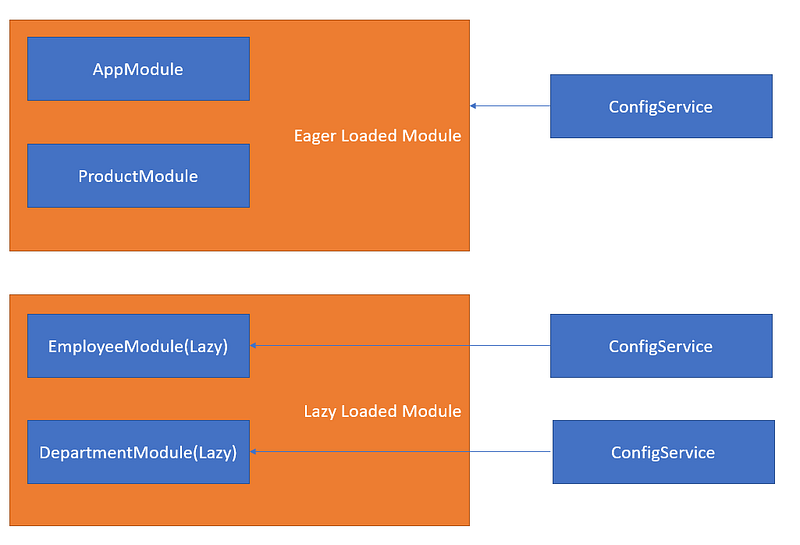
Figure 3. Any provider scope.
Conclusion
Earlier for all developers it was a challenge whenever they wanted to make sure they get a new instance of a service for lazy-loaded modules. Now with the 'any' option to provide services in injector scopes, it’s simplest thing to do. We can provide any tokens and developers can provided the values per lazy-loaded module. The service will always create a new instance per lazy-loaded module.
You can download the code from GitHub.